Electron apps: web browsers in a trenchcoat

FastMail released a native, cross-platform app a while ago. It's an Electron app, so, basically web pages and web browsers running locally. It looks almost exactly like its web page.
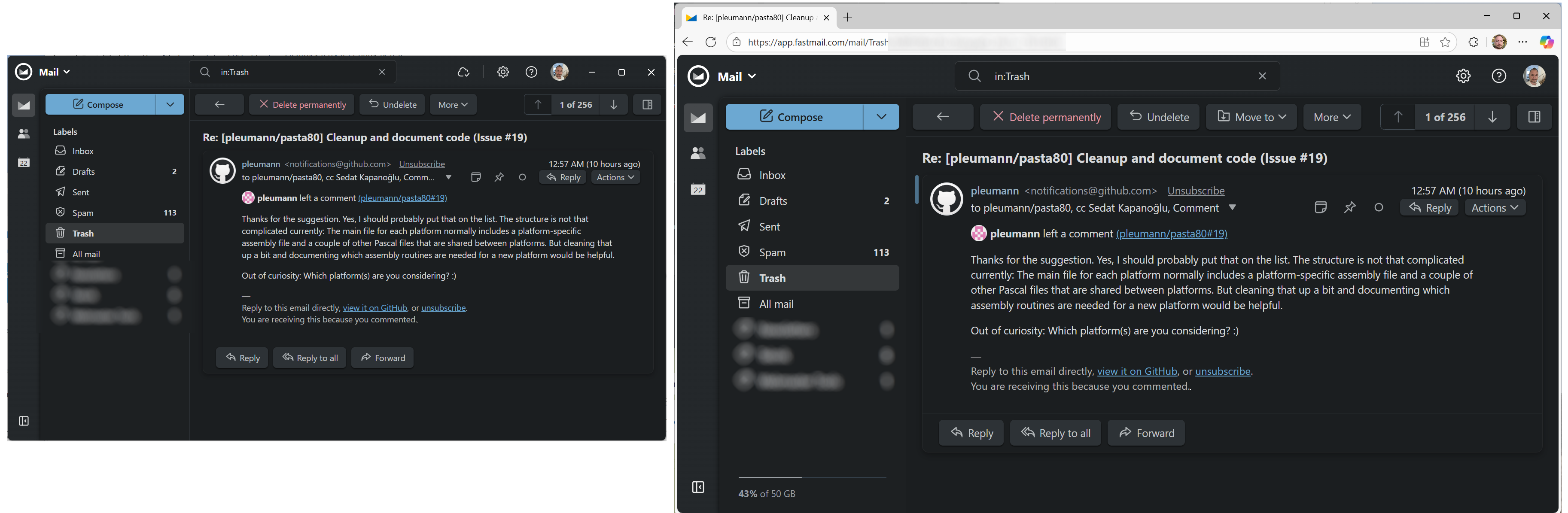
The only discernible difference is that the native app doesn't show the mail capacity indicator for unknown reasons, but the rest is pretty much the same.
So, you expect an Electron app be the better version of a web page. In FastMail's case for example, you can access your email even when FastMail is offline, which is huge. If that's what you're looking for, great even. You could also do that with PWAs too, but Google decided to kill it anyway. In the end, my experience is almost always worse with Electron apps.
When I install the app, it chooses a text size based on Operating System defaults. That makes sense, but immediately something to set up for me. Because a web browser is for reading, and the operating system is for pressing buttons, therefore, my zoom settings are different for those two.
But, the fix easy, right? I'll just zoom in if I have trouble, like on a web browser? No, it's not that easy. Most Electron apps don't let you to zoom in to text using Ctrl+MouseWheel or Ctrl++ /- keys. FastMail isn't an exception either.
Fortunately, FastMail's app has text size selection in its settings. You need to experiment individually if they're the right fit or not. So, go to settings, select text size, go back to an email. Repeat this for up to six different text size options. If they're not good for you, you're out of luck.
The reason you need to go back and forth between settings and email is because FastMail, like most Electron apps, doesn't support multiple tabs. So, you can't open settings on one tab, and your mail on another. You can't even open a mail on a separate pop-up window. For a desktop email client, I think having multiple window support should be a given.
You could do all these on FastMail's web page with no issues. Electron apps are almost always less usable and less accessible than their web page counterparts despite having the same code base.
Electron apps come with a version of Chromium engine which can't receive updates separately. It only gets updates when Electron integrates those updates, and when the vendor decides to release an update with the new Electron version. Otherwise, you might as well be using Chrome from two years ago with all the security vulnerabilities enabled.
On the security front, sandboxing can be an issue too. It can be selectively disabled on Electron apps by the developer, and it's impossible for you to tell how secure is an Electron app by looking at it. That's something a web page can never do.
So, you basically have less usability, less security with Electron apps, and you pay a huge memory tax.
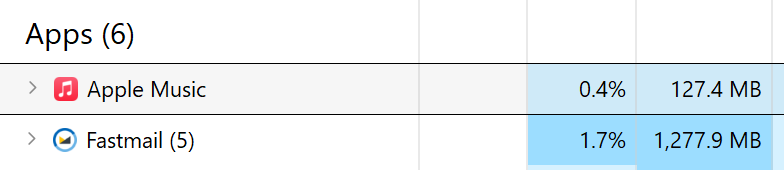
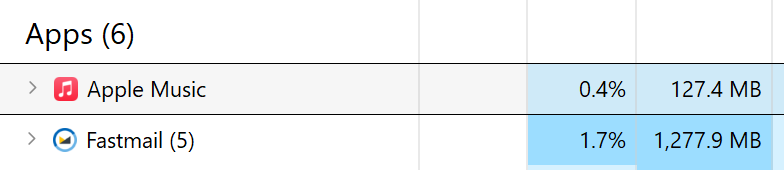
Apple Music is a native WinUI app and consumes an order of magnitude less RAM than Fastmail. Obviously, they're different apps, duh. It's just ironic that Apple has managed to release a native Windows app while Microsoft has been chickening out from using its own GUI infrastructure, and sticking to HTML and JavaScript instead even for the very basic services of the operating system.



But WebViews...
WebViews are better and worse. Better because an operating system usually has one WebView component, and that can be shared between apps. That means, it can receive security updates regardless you update your app or not. They also tend to be more lightweight as they share common code. They are also worse because different operating systems use different web engines, and it's quite possible that your app wouldn't look the same, or work even, on a different platform.
That's pretty much the promise of Electron: "write once, run anywhere". I'm pretty sure that that slogan once belonged to Java.
Almost no cross-platform testing is necessary unless you use OS-specific features of course. WebViews can't promise that. And, to be fair, WebViews feel like the worst of two worlds than the best: still bloated enough and yet likely with quality issues.
The price you pay is more than the obvious. The memory usage stands out, but I'm not actually that obsesseed with RAM. I know that operating systems can optimize its usage based on which app is at the time need it the most. So, I know that we could ran 20 apps that use a gigabyte each on a system with 8GB RAM. But, I also know that there's still a cost. It's felt at some point. Sometimes, the app you click on responds a second late, sometimes a window refuses to move for a second. Sometimes, you wait a bit longer. They're all small cuts until you die by a thousand of them, and want to throw the computer out of the window.
To add salt to the wound, every Electron app comes with their own user interface language. It's the web. It's free form. It's the epitome of artistic expression. The cost is that users must figure it out. Is that a button or is it a label with a low-contrast background? Some opt for a flat style, some have entirely different understanding of contrast. And what if you prefer dark mode? Electron apps need to invent their own palette from scratch, probably incompatible with whatever you have.
Companies save money by choosing Electron, and users pay for it. It's like tariffs, but users pay with their time and frustration.
That said, my greatest problem with WebView/Electron apps aren't those problems. It's the irresponsibility. An app running on your device should warrant a certain adherence to that platform's user interface style, a certain level of responsiveness, a certain level of cooperation with the other apps, and some degree of accessibility. You expect the apps to be well-behaved. But, what we instead get is this layers of programming, markup and styling languages on top of each other with a UI language never seen before, almost like a Mac emulator running Amiga emulator running MS-DOS, consuming all of their resources combined.
Native apps aren't always better. Apple Music is a proof of that. They have that beautiful looking, lean, native WinUI-based app on Windows, but it's extremely buggy and clunky for some reason. It freezes and crashes despite using very little RAM. So, it's not Electron, it's the irresponsibility in the end, but Electron makes it really easy to be irresponsible.