On versioning
I didn’t investigate the history of versioning per se, but I’m pretty sure first version numbers were just simple integers: 1, 2… Apollo…


I didn’t investigate the history of versioning per se, but I’m pretty sure first version numbers were just simple integers: 1, 2… Apollo spacecraft didn’t have decimal versions despite how minor the upgrade to the vehicle’s design was. It was Apollo 11, 12 and 13. The decimal part probably had to appear when a change had to happen but didn’t call for a new major version.
Version numbers used to resemble decimal numbers for a long time, such as 1.05 where an increase in the whole part of the number would mean significant changes and increase in the fraction would mean minor fixes or upgrades.
Because programmers wanted to find a middle-point between major and minor, some decided to use minor part as “new features” and added a latter at the end to denote minor fixes. 1.05a would upgrade to 1.05b in a minor release. Back in the 90’s, I used to use letters in alpha or beta versions of my software and dropped them after they are considered 1.00. I didn’t always follow through the same version layout though.
Web browsers started to use whole numbers as versions to denote new releases based upon their release cycle in the last decade. I think Chrome started the trend. No more 1.05, 3.02. You had Chrome 1, 2, 3, and so on.
All of the version numbers were user-oriented. From a user’s perspective, dotted version numbers aren’t as meaningful as whole numbers. Windows 8.1 didn’t catch on; it didn’t encourage to upgrade from Windows 8, because it implied only tenth of an improvement a hypothetical Windows 9 would provide.
We started to observe the psychology of version numbers in the market in the 80’s. The major player in the word processor market was WordPerfect 5.1 and Microsoft Word for Windows had only come out with its version 2.0. Maybe people compared numbers and kept working with WordPerfect, assuming it was much better than Word, or who knows, they just didn’t see the need to upgrade. Whatever the problem was with Word, it became Word 6.0 in its next release. The rest is history as Microsoft Word dominated the market eventually, and WordPerfect, despite that they tried to counter the version war with their own WordPerfect 7, they were late to Windows platform and lost their market domination.
Dealing with versions was easy when only users cared about them. Windows operating system used to set the same OS version to all of its binaries as they were developed and released together. FreeBSD also followed a similar approach. All OS modules were developed and released together. After the advent of Linux, building an OS out of many independently developed components started to become a thing, and that’s probably when versioning started to become an issue with programmers too, not just users.
It’s not the individual versioning differences that was the problem with software developers though; it was the dependencies and the reality of breaking compatibility. A component was usually shipped only once with the OS and if two other components relied on two different versions of it, things would go haywire. That problem itself created the infamous “DLL hell” in Microsoft Windows, but it wasn’t only Windows that suffered from it.
Even a single app would have a problem if one of its dependencies depend on a different version of a component the app itself also depends on.
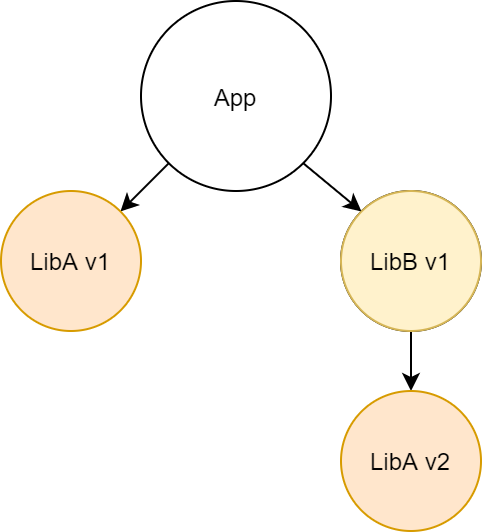
Assume that LibA is incompatible with LibB. What do you do? This created the whole problem with componentization and dependencies, and with every dependency it got more complicated by an order of magnitude.
Ideally, both libraries would coexist and could be used together, but it can still cause problems as libraries can be using common resources and can interfere with each other’s work. The way libraries are mapped in memory in operating system also may not allow multiple versions of the same library to be used at the same time at all. .NET doesn’t allow it out of the box. All you can do is to “forward” requests to the new version of the library, hoping that it would be compatible with the newer version.
The problem with dependencies is yet to be resolved, but the randomness in component versions made this problem worse as developers weren’t able to predict if a certain upgrade would break their software or not. It would involve a lot of guesswork. Then, there came SemVer (Semantic Versioning) to fix this problem.
SemVer tried to give a more concrete meaning to the components of a version number. A semantic version would consist of three parts: major.minor.patch, so it’s obvious that it’s not a decimal number. That means 1.1.2 is a many 18 releases older than 1.1.20. SemVer came with three simple rules:
- If it’s a release with a breaking change in the API, increase the major version.
- If there are no breaking changes but there is a new feature, increase the minor version.
- Increase the patch version for every other releases.
That meant that you could immediately know 1.1.0 is perfectly compatible with 1.99.35, so safe to upgrade, but 2.0.0 might not be compatible with 1.99.35 at all. It might even require a complete rewrite of your code that uses that library.
Minor version isn’t useless either. It subtly implies that if you keep using the newer minor version of a library, it might not be possible for you to go back to an older minor version because you might start using the new features that weren’t in the older minor versions.
Changes in patch version is a green light to upgrade. You immediately know that it’s a version with fewer bugs. It’s almost always safe to upgrade to a newer patch version of a library that follows SemVer strictly, “strictly” being the keyword here.
It’s hard to abide SemVer in the real world because the realities of version numbers in regards to software development and marketing can collide because there is marketing for libraries too.
I saw the most recent example of this with jQuery 3.5.0 upgrade from 3.4.1. It broke backwards compatibility with all previous jQuery versions about a specific feature, DOM creation, but it didn’t jump to 4.0.0. That’s because major versions would still mean major upgrades for jQuery, not just versions with breaking changes. That’s how it’s marketed to software developers and they didn’t want to create the false sense of great improvements. Instead, they added documentation and workarounds to keep the compatibility after an upgrade. Since it was a security related change, they didn’t want to make it opt-in either.
It all makes sense from jQuery’s point of view. But for a developer, 3.5.0 is almost a no brainer upgrade, I mean it’s literally called a minor upgrade, because it’s supposed to have no breaking changes. A developer could completely omit reading release notes and create a serious problem that breaks their production code in a catastrophic way. Apparently, their understanding of a major version is aligned more with a term like “generation”.
jQuery isn’t the only example. Many libraries conflate their business rhythm with the development versions and deviate from SemVer significantly. They aren’t exactly using SemVer, yet they claim to be.
The reality of programming demands faster upgrade scenarios. Upgrading packages is a race towards future. If you are behind, a new library that you need to use may not play nicely with the old versions of other libraries. You need to stay up to date and you need to make these decisions fast.
The only solution to fast upgrades today seems to be having solid tests in place. Unit tests may not cut it as they are also subject to package dependencies and they may not be in sync with the actual code in that regard. This is, in fact, where language-integrated unit tests as in D or Go makes sense. You might need to add integration tests when using other languages, to ensure that a package upgrade won’t destroy your livelihood.
SemVer may not be the ideal solution, but it certainly is a decent effort to answer a specific question over a vague “major is big, minor is small” sentiment: “could this version break my code?”. We might still need a better approach to versioning, perhaps we should accept that libraries are also products with marketing requirements and decouple development versions from marketing versions completely, but there is definitely a need for package maintainers to revise their understanding of versioning strategies.
Whether it is for profit or not, any valuable service must have a business strategy. Libraries are no exception. Versioning and release cycle are parts of that business strategy.